Connecting Booking Systems to Access Control
How I connected a booking system to an access control system so door permissions follow room allocations automatically—without anyone remembering to do it.
The Integration Gap
A university college has two separate systems that need to work together:
- KX (Kinetic Solutions) — the accommodation system. Staff book students into rooms here. It knows "John Doe is in Room A26 from October to July."
- Salto Space — the door lock system. Controls which keycards open which doors. It knows "John Doe's card can open Door A26."
The problem isn't just "two systems don't talk". It's ownership. KX is where decisions happen (who gets which room, and when). Salto is where the door actually opens. That gap creates a question nobody wants to answer: who turns a booking into access?
Three departments touch this process: Accommodation creates bookings, Porters deal with keys and lockouts, Student Services handle arrivals and changes. Without automation, everyone assumes it's "someone else's job".
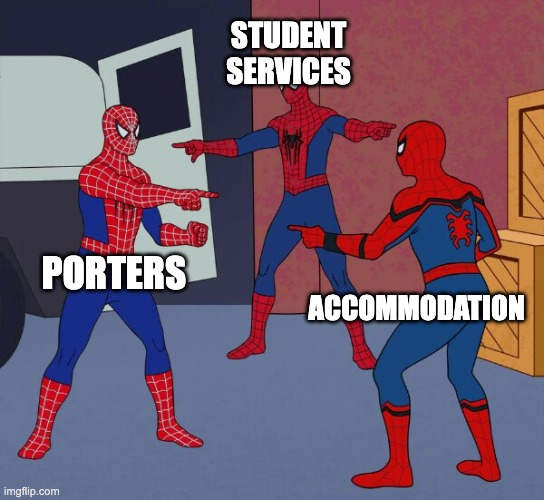 The information lives in KX, but the action happens in Salto. Without a link between them, responsibility gets blurry.
Before the integration: Manual work. Someone opens Salto, finds the right doors (bedroom, building entrance, shared facilities), and copies dates from KX. Slow. Repetitive. Error-prone. A single typo becomes a student standing outside their room.
I built an integration that makes this automatic. KX stays the source of truth. Salto gets updated on a schedule. Access follows bookings without anyone remembering to do it.
The Disconnect: Why a JOIN is Impossible
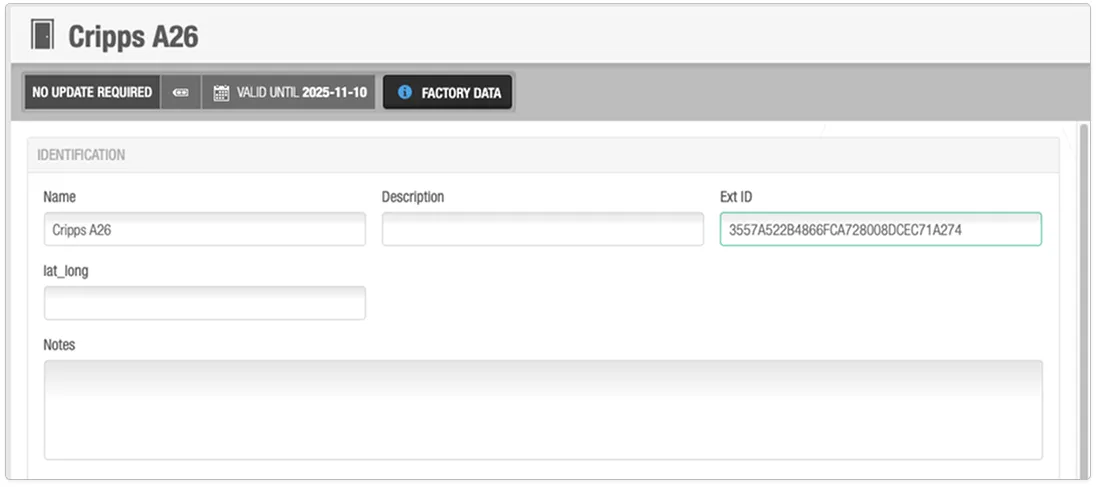 Salto knows the door, but there’s no shared key with KX.
KX knows who lives where and when. Salto controls which keycards open which doors. But they don't share a common identifier. Looking at these tables as an engineer, there is no reliable way to JOIN them.
The Data Reality (BEFORE)
Table: KX Rooms (Source)
| Room_ID | Room_Name | Block_ID | Block_Name |
|---|---|---|---|
| 360 | Cripps A 26 | 53 | Cripps A |
| 361 | Cripps A 27 | 53 | Cripps A |
| 420 | Cripps B 14 | 54 | Cripps B |
Table: Salto Doors (Target) — BEFORE
| Door_ID | Door_Name | ExtLockID (BEFORE) |
|---|---|---|
| 937 | Cripps A26 | 3557A522B4866FCA72B008DCEC71A274 |
| 898 | Cripps A27 | 8F2B3D4E5A6C7B8D9E0F1A2B3C4D5E6F |
| 922 | Cripps B14 | A1B2C3D4E5F67890ABCDEF1234567890 |
The Problem: No foreign key relationship exists. String matching ("Cripps A 26" vs "Cripps A26") is fragile and error-prone. GUIDs are meaningless to KX. One typo in manual entry means a student can't get into their own room.
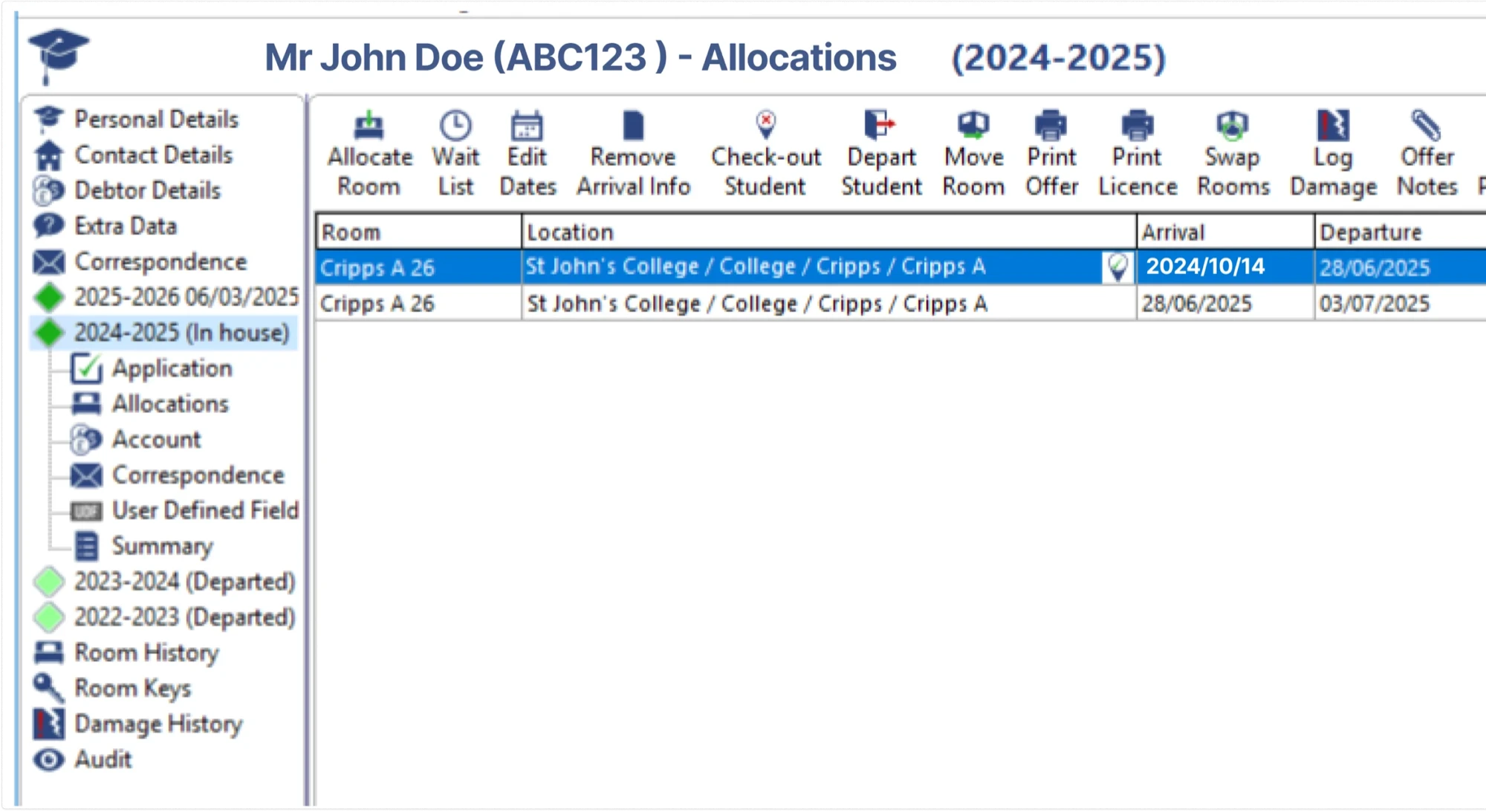 The allocation in KX is the starting point for every access decision.
Creating a Common Language
1. Mapping doors to rooms
KX calls a room "Room 360". Salto calls the same door "Cripps A26" with a random internal ID. To connect them, I needed a shared key.
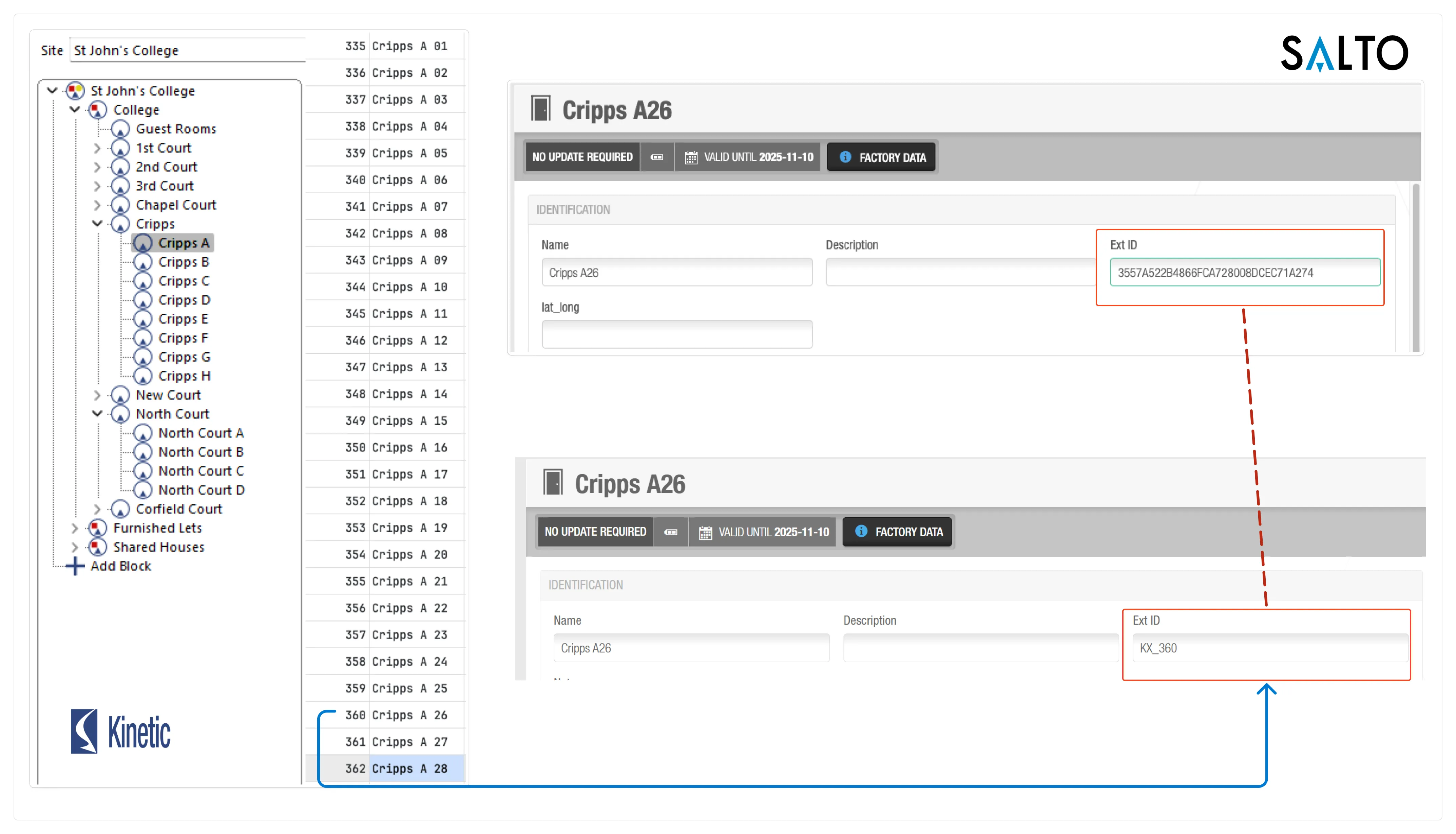 Door ID mapping: KX shows room 360 = "Cripps A 26". Salto had a cryptic GUID. After renaming to
 KX_360, the systems can talk.
I created a naming convention. Rename every door in Salto to include the KX room ID.
Pattern: KX_ + room_id. Room 360 in KX becomes KX_360 in Salto. Now the code can match them.
How I matched every door
- Exported all rooms from KX to a CSV file
- Exported all doors from Salto to another CSV
- Used an LLM to match names like "Cripps A 26" to "Cripps A26" (same room, different formatting)
- Generated SQL to update Salto ExtLockID values to the KX_ naming pattern (400+ doors)
The Data Reality (AFTER)
Table: KX Rooms (Unchanged)
| Room_ID | Room_Name | Block_ID |
|---|---|---|
| 360 | Cripps A 26 | 53 |
| 361 | Cripps A 27 | 53 |
| 420 | Cripps B 14 | 54 |
Table: Salto Doors (Modified) — AFTER
| Door_ID | Door_Name | ExtLockID (AFTER) |
|---|---|---|
| 937 | Cripps A26 | KX_360 |
| 898 | Cripps A27 | KX_361 |
| 922 | Cripps B14 | KX_420 |
| … | … | … |
The Solution: Now the connection is reliable:
1SELECT2 *3FROM kx_rooms4INNER JOIN salto_doors5ON CONCAT('KX_', kx_rooms.Room_ID) = salto_doors.ExtLockIDSQL script (one-time setup)
1-- Run once to set ExtLockID based on LLM mapping2UPDATE SALTOSPACE.dbo.tb_Locks SET ExtLockID = 'KX_360' WHERE id_lock = 937;3UPDATE SALTOSPACE.dbo.tb_Locks SET ExtLockID = 'KX_361' WHERE id_lock = 898;4UPDATE SALTOSPACE.dbo.tb_Locks SET ExtLockID = 'KX_420' WHERE id_lock = 922;5-- ... (hundreds more)In Salto’s SQL Server database this field is called ExtLockID; when we mirror the data into MariaDB for the staging and business-rules layer, we treat the same value as
ExtDoorID. It’s the same identifier travelling through the pipeline.
Handling what KX cannot see
Individual room doors are the easy part. But students also need access to shared spaces: building entrance, stairwell, laundry room. KX only knows bedrooms (bookable rooms). Salto knows all doors. This gap needed explicit modeling.
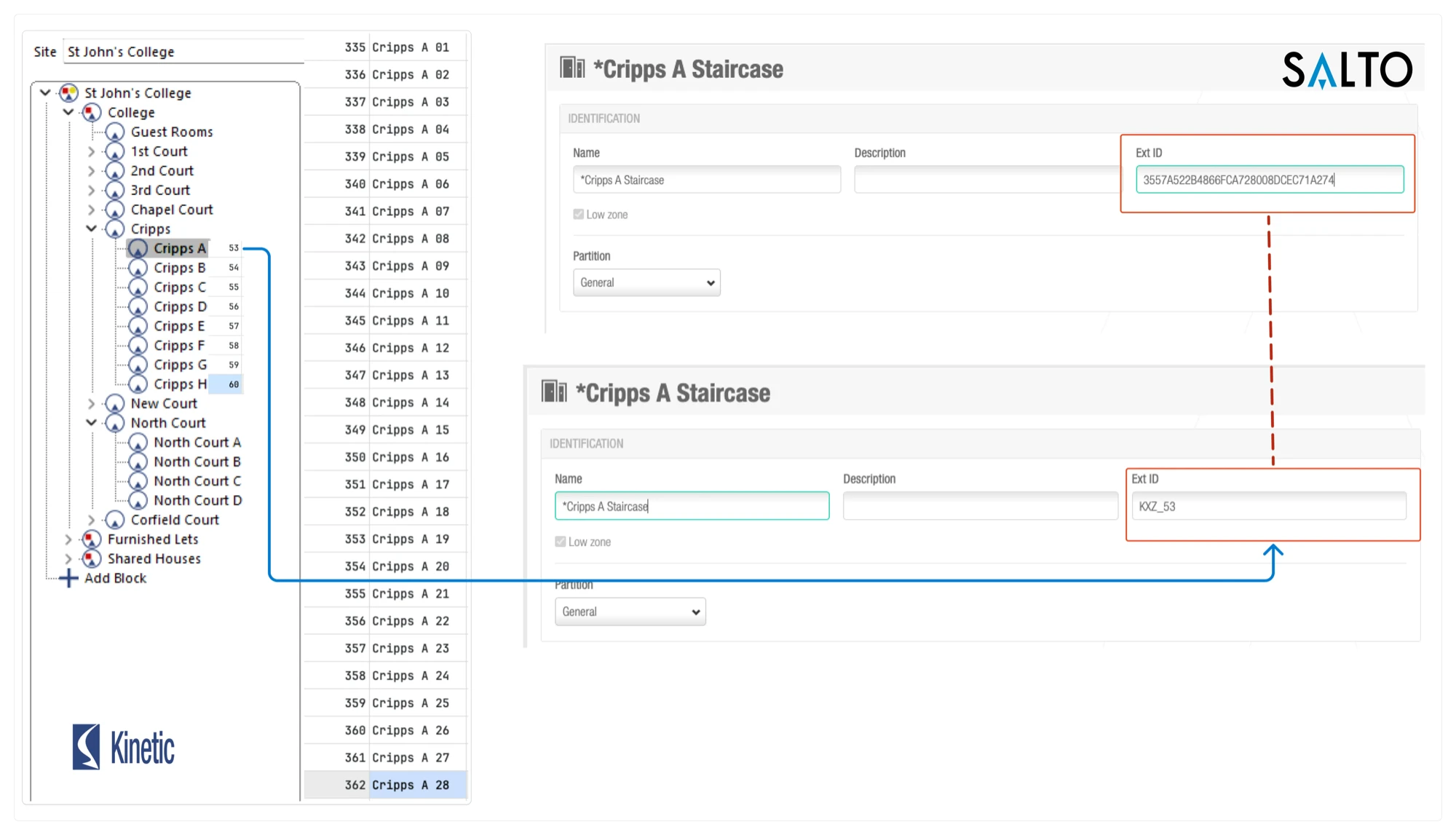 Zone mapping: KX groups rooms into "blocks" (Cripps A = block 53). Salto zones are renamed to
 KXZ_53 using the same pattern.
A student in Cripps A room 26 (room ID 360, block ID 53) automatically gets:
- Their bedroom door (
KX_360) - All common areas in their building (
KXZ_53) — entrance, stairs, corridors, laundry
Handling shared bathrooms
Some bathrooms are shared between two or three rooms. These don't have their own KX room ID—they're facilities, not bedrooms.
Solution: Use Salto's "Notes" field to list which rooms share that bathroom. If the Notes field says KX_360,KX_361, then anyone in room 360 or 361 gets access.
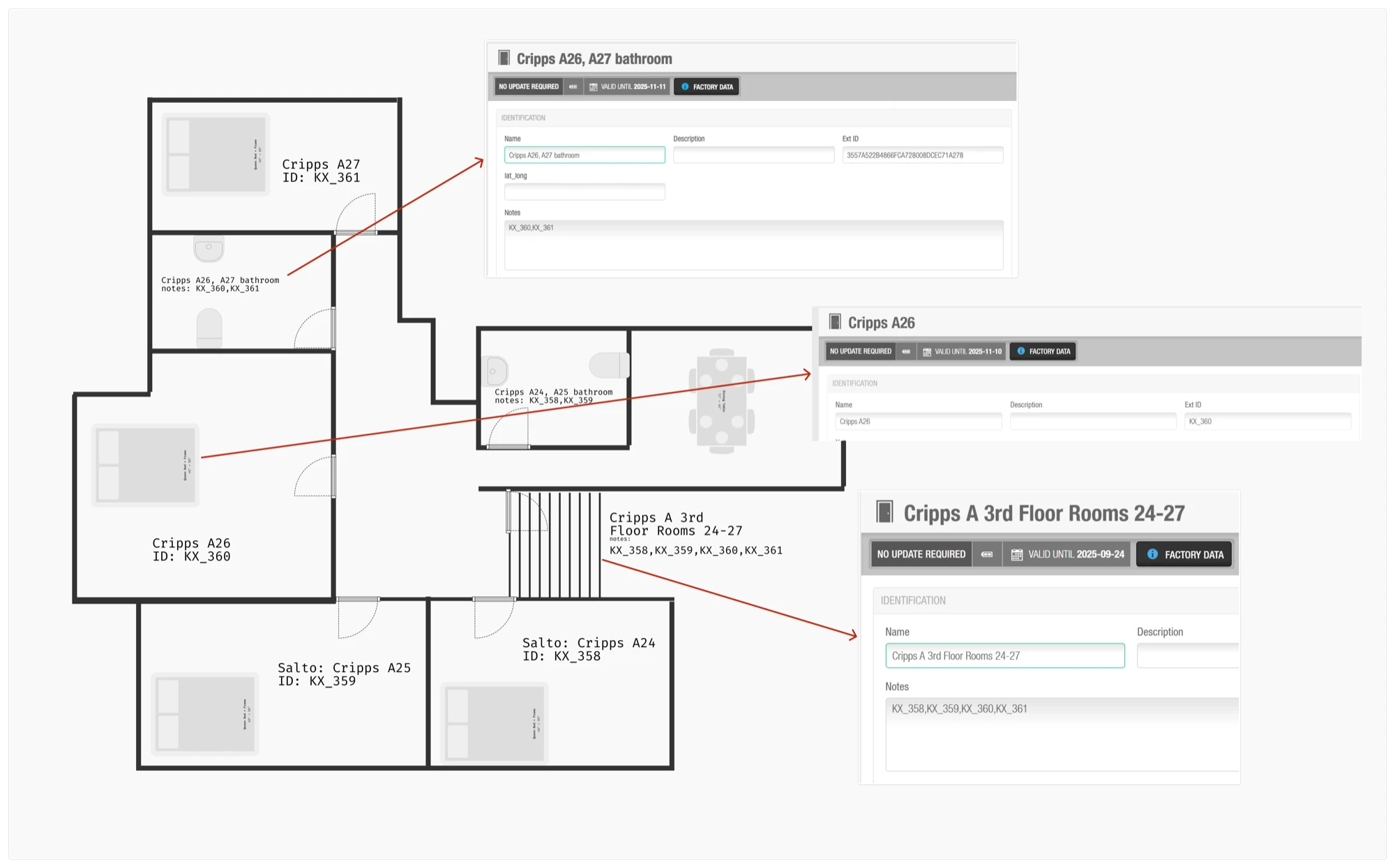 Shared facilities solution: Individual rooms get
 KX_ names. Shared bathrooms keep their GUIDs but use the Notes field to list which rooms they serve.
Source of Truth: Who Wins?
When KX says one thing and Salto says another, what wins? This wasn't just a technical choice—it was a process decision. We evaluated three strategies and agreed on a path forward with the different departments.
| Strategy | Logic | Pros | Cons |
|---|---|---|---|
| 1. Preserves Salto (original) | Salto dates are sacred. Only add new access. | Safe against overwrites. | Lockouts. If KX extends dates but Salto doesn't, the student is locked out. |
| 2. Preserves KX (chosen) | KX is authoritative. Salto mirrors KX exactly. | Single source of truth. Can extend AND revoke. | Strict. Removes manual overrides. Requires discipline. |
| 3. Date Extension | Use widest range (earliest start, latest end). | Zero lockouts. Self-healing. | Security. Cannot revoke access early. Requires manual cleanup. |
The Result: Preserves KX
- Single source of truth: Room allocations live in KX. Period.
- No "shadow state": One place to check: KX.
- Forces discipline: If someone needs early access, the change happens in KX.
Manual overrides must be reflected in KX or kept outside the sync. This stopped mystery lockouts caused by stale manual data.
Architecture
The system follows a strict Extract → Stage → Calculate → Apply pattern. By decoupling the logic into a staging database, the process is:
- Idempotent: Can run multiple times safely without side effects
- Auditable: The staging table can be inspected before Salto applies changes
- Portable: Can run in a container, on a server, or locally during outages—no complex infrastructure dependencies
- Decoupled: Python moves data. SQL contains business logic.
1%%{init: {'theme':'dark', 'themeVariables': { 'fontSize':'16px'}}}%% 2graph TB 3 KX["KX Live<br />(SQL Server)<br />Room Allocations"] 4 CSV["CSV Cards<br />(File System)<br />Valid Card Holders"] 5 SALTO_IN["Salto System<br />(SQL Server)<br />Users, Doors, Zones"] 6 KX -.-> DB_TOOL 7 CSV -.-> DB_TOOL 8 SALTO_IN -.-> DB_TOOL 9 DB_TOOL["db_tool.py<br />(Python ETL)<br />Cross-DB Sync Tool"]10 DB_TOOL ==> STAGING11 STAGING["MySQL/MariaDB<br />Staging Database<br />staging_users_doors_zones"]12 STAGING ==> RULES13 RULES["Business Rules<br />(SQL Views)<br />Door & Zone assignments"]14 RULES ==> REPORTS15 RULES ==> LISTS16 LISTS ==> SALTO_OUT17 REPORTS["Validation Reports<br />(Excel Files)"]18 LISTS["List Generation<br />ExtDoorIDList<br />ExtZoneIDList"]19 SALTO_OUT["Salto Space<br />Database Sync<br />(reads staging table)"]Data flows from three sources, merges in staging, business rules apply via SQL views, and output splits into validation reports (for humans) and access lists (for Salto).
The staging table
The heart of this operation isn't the Python script. It's the database schema. Salto's Database Sync reads from a staging table we populate. Here's what a single student row looks like:
1crsid: 'jd456' 2FirstName: 'John' 3LastName: 'Doe' 4ToBeProcessedBySalto: 1 // Ready for import 5 6ExtDoorIDList: {KX_360, 0, 2024-10-01T00:00:00, 2025-06-28T00:00:00}, {KX_361} 7 ^ Room 360 (time-limited) + Shared Bathroom 361 (permanent) 8 9ExtZoneIDList: {KXZ_53, 0, 2024-10-01T00:00:00, 2025-06-28T00:00:00}10 ^ Cripps Building zone accessKey columns: ExtDoorIDList and ExtZoneIDList contain formatted access grants.
When ToBeProcessedBySalto = 1, Salto reads the row, parses the lists, and grants permissions. Our entire job is generating those strings correctly.
The sync tool
I needed a simple tool to pull data from multiple sources and to run SQL files against each database reliably. db_tool.py does exactly that: it executes a SQL file against a
chosen source and writes the results into another database or an export file.
The diagram below shows its two modes: sync (database to database) and export (database to file).
1%%{init: {'theme':'dark', 'themeVariables': { 'fontSize':'16px'}}}%% 2graph LR 3 subgraph SYNC["SYNC MODE (--to)"] 4 direction LR 5 SQL1["SQL Server"] 6 MYSQL1["MySQL"] 7 FILE1[".sql File"] 8 TOOL1["db_tool.py<br />(--to)"] 9 OUT1["MySQL"]10 OUT2["SQL Server"]11 SQL1 -.-> TOOL112 MYSQL1 -.-> TOOL113 FILE1 -.-> TOOL114 TOOL1 ==> OUT115 TOOL1 ==> OUT216 end1718 subgraph EXPORT["EXPORT MODE (--out)"]19 direction LR20 SQL2["SQL Server"]21 MYSQL2["MySQL"]22 FILE2[".sql File"]23 TOOL2["db_tool.py<br />(--out)"]24 EXCEL["Excel"]25 CSV["CSV"]26 SQL2 -.-> TOOL227 MYSQL2 -.-> TOOL228 FILE2 -.-> TOOL229 TOOL2 ==> EXCEL30 TOOL2 ==> CSV31 endUsage is simple: pass a SQL file, pick a source, and pick a destination.
1# Sync room allocations from KX Live to local MariaDB staging 2python db_tool.py sync \ 3 --truncate \ 4 --sql queries/sync-room-allocations-from-kxlive.sql \ 5 --from kxlive \ 6 --to mariavdt \ 7 --table kxroomallocations 8 9# Export a validation report to Excel10python db_tool.py export \11 --table critical_students_losing_access_early \12 --from mariavdt \13 --out exports/critical_students_losing_access_early.xlsxThe --truncate flag clears the table first. Clean slate each run, no stale data.
Deciding who wins: A political decision
When KX says one thing and Salto says another, what wins? This wasn't a technical question—it was a political one. We evaluated three strategies before the departments agreed on a path forward.
| Strategy | Logic | Pros | Cons (Why we rejected it) |
|---|---|---|---|
| 1. Preserves Salto (original) | Salto dates are sacred. Only add new access. | Safe against overwrites. | Lockouts. If KX says "July" but Salto says "June", the student is locked out. |
| 2. Preserves KX (chosen) | KX is authoritative. Salto mirrors KX exactly. | Single source of truth. Can extend AND revoke. | Strict. Removes manual overrides. Requires process discipline. |
| 3. Date Extension | Use the widest range (earliest start, latest end). | Zero lockouts. Self-healing. | Security Risk. Can never revoke access early. Requires manual cleanup. |
The Verdict: Preserves KX
After testing all scenarios, Accommodation, Porters, and Student Services chose Strategy 2.
- Single source of truth: Room allocations live in KX. Period.
- Eliminates "shadow state": No more "but the porter said..." arguments. One place to check: KX.
- Forces process discipline: If someone needs early access, the change happens in KX.
The tradeoff? Manual overrides must be reflected in KX or kept outside the sync. This took convincing, but it stopped mystery lockouts caused by stale manual data.
Deep Dive: The SQL Behind "Preserves KX"
This is simplified pseudocode for the preserves-KX logic – the real production view is more verbose and joins via internal Salto IDs, but the core idea is the same.
1SELECT 2 consolidated_kx.crsid, 3 CASE 4 -- New access: KX dates only 5 WHEN salto_users_locks.ExtDoorID IS NULL THEN 6 CONCAT('{', salto_doors.ExtDoorID, ', 0, ', 7 DATE_FORMAT(consolidated_kx.EarliestArrivalDate, '%Y-%m-%dT%H:%i:%s'), ', ', 8 DATE_FORMAT(consolidated_kx.LatestDepartureDate, '%Y-%m-%dT%H:%i:%s'), 9 '}')10 11 -- Existing access: KX overwrites Salto dates12 WHEN salto_users_locks.UsePeriod = 113 AND consolidated_kx.EarliestArrivalDate IS NOT NULL THEN14 CONCAT('{', salto_doors.ExtDoorID, ', 0, ',15 DATE_FORMAT(consolidated_kx.EarliestArrivalDate, '%Y-%m-%dT%H:%i:%s'), ', ',16 DATE_FORMAT(consolidated_kx.LatestDepartureDate, '%Y-%m-%dT%H:%i:%s'),17 '}')18 19 -- Fallback: permanent access (no dates in KX)20 ELSE CONCAT('{', salto_doors.ExtDoorID, '}')21 END AS door_access_string22FROM consolidated_kx23INNER JOIN salto_doors ON24 -- Direct room match25 consolidated_kx.ExtDoorID = salto_doors.ExtDoorID26 OR27 -- Shared facility match (bathrooms via Notes field)28 FIND_IN_SET(consolidated_kx.ExtDoorID, salto_doors.Notes) > 029LEFT JOIN salto_users_locks ON30 salto_users_locks.crsid = consolidated_kx.crsid31 AND salto_users_locks.ExtDoorID = salto_doors.ExtDoorID;The FIND_IN_SET join is the key to shared bathrooms. If salto_doors.Notes contains KX_360,KX_361, then any student with ExtDoorID = KX_360 or KX_361 gets access to that
bathroom.
The daily pipeline
The whole thing runs automatically every hour. Here's the flow:
1crsid: 'jd456' 2FirstName: 'John' 3LastName: 'Doe' 4ToBeProcessedBySalto: 1 // Ready for import 5 6ExtDoorIDList: {KX_360, 0, 2024-10-01T00:00:00, 2025-06-28T00:00:00}, 7 {D367FCDB669F16CF6F8008DA632424C9, 0, 2024-10-01T00:00:00, 2025-06-28T00:00:00} 8 ^ Room 360 (time-limited) + shared bathroom door GUID 9 (bathroom door is linked via Notes = "KX_360,KX_361")1011ExtZoneIDList: {KXZ_53, 0, 2024-10-01T00:00:00, 2025-06-28T00:00:00}12 ^ Cripps Building zone accessStep 0: Back up staging for audit
Capture a timestamped copy of the staging table before any changes.
1BACKUP_TABLE="$(date +%Y-%m-%d-%H.%M.%S)_staging_users_doors_zones"2mysql --defaults-group-suffix=mariavdt -D salto_sync_backups \3 -e "CREATE OR REPLACE TABLE \`${BACKUP_TABLE}\` AS SELECT * FROM salto.staging_users_doors_zones"Step 1: Copy data into the staging database
Pull fresh data from each source into MariaDB. Then the SQL views can calculate access in one place.
1# KX room allocations2python db_tool.py sync --truncate --sql queries/sync-room-allocations-from-kxlive.sql --from kxlive --to mariavdt --table kxroomallocations1# Salto system data (doors, users, zones)2python db_tool.py sync --truncate --sql queries/sync-salto-doors.sql --from vsalto --to mariavdt --table salto_doors3python db_tool.py sync --truncate --sql queries/sync-salto-users.sql --from vsalto --to mariavdt --table salto_users4python db_tool.py sync --truncate --sql queries/sync-salto-users-locks.sql --from vsalto --to mariavdt --table salto_users_locks5python db_tool.py sync --truncate --sql queries/sync-salto-users-zones.sql --from vsalto --to mariavdt --table salto_users_zones6python db_tool.py sync --truncate --sql queries/sync-salto-zone-locks.sql --from vsalto --to mariavdt --table salto_zone_locks7python db_tool.py sync --truncate --sql queries/sync-salto-zones.sql --from vsalto --to mariavdt --table salto_zones1# Load card issue records from CSV2mysql --defaults-group-suffix=mariavdt -D salto < queries/load-issued-cards-from-csv.sqlStep 2: Snapshot Salto state for audit
Capture the current Salto-mirrored state before updating access lists.
1mysql --defaults-group-suffix=mariavdt -D salto < queries/capture-salto-sync-audit.sqlStep 3: Run the SQL logic and update the Salto staging table
SQL views calculate each person's ExtDoorIDList and ExtZoneIDList. Then we write the final strings into the table Salto reads.
1mysql --defaults-group-suffix=mariavdt -D salto < queries/update-staging-with-access-lists.sqlStep 4: Export validation reports
Even though the process is automated, we still export reports for visibility. Missing cards, date mismatches, conflicts, changes.
1mkdir -p expor 2python db_tool.py export --table access_date_mismatches --from mariavdt --out exports/access_date_mismatches.xlsx 3python db_tool.py export --table critical_students_losing_access_early --from mariavdt --out exports/critical_students_losing_access_early.xlsx 4python db_tool.py export --table kx_allocations_no_cards --from mariavdt --out exports/kx_allocations_no_cards.xlsx 5python db_tool.py export --table room_conflicts_multiple_students --from mariavdt --out exports/room_conflicts_multiple_students.xlsx 6python db_tool.py export --table students_duplicate_access --from mariavdt --out exports/students_duplicate_access.xlsx 7python db_tool.py export --table users_permanent_access --from mariavdt --out exports/users_permanent_access.xlsx 8python db_tool.py export --table users_with_expired_access --from mariavdt --out exports/users_with_expired_access.xlsx 9python db_tool.py export --table view_sync_changes --from mariavdt --out exports/salto_sync_changes.xlsx10python db_tool.py export --table view_sync_changes_by_days --from mariavdt --out exports/sync_changes_by_days.xlsx11python db_tool.py export --table users_wrong_room --from mariavdt --out exports/users_wrong_room.xlsx12wait13 14pwsh ./4-export-to-sharepoint.ps1Flagging what the sync can't fix
The sync works great when data is clean. But it can't fix missing keycards, misconfigured doors, or students with access to wrong rooms. That's what validation reports are for—they flag issues needing human judgment.
Daily validation reports
Example 1: Students Missing Door Access
| CRSID | Student Name | Room (KX) | Door ID | Impact |
|---|---|---|---|---|
jd456 |
John Doe | Cripps A 26 | KX_360 |
Can't open bedroom door |
sm782 |
Sarah Mitchell | Cripps B 14 | KX_420 |
Can't open bedroom door |
al923 |
Alex Liu | Cripps A 27 | KX_361 |
Can't access shared bathroom |
Action: Check if door exists in Salto with correct ExtDoorID, verify student has valid card, run sync manually if needed.
Example 2: Students Missing Zone Access
| CRSID | Student Name | Sublocation | Zone Name | Impact |
|---|---|---|---|---|
rw534 |
Rachel Wilson | KXZ_53 |
Cripps A Building | Can't enter building |
mb671 |
Michael Brown | KXZ_54 |
Cripps B Building | Can't use elevators or stairwells |
Action: Verify zone mapping between KX sublocation IDs and Salto ExtZoneIDs, then re-run sync.
Example 3: Users with Access to Wrong Rooms
| CRSID | Student Name | Salto Access (Wrong) | KX Allocation (Correct) | Risk |
|---|---|---|---|---|
ep845 |
Emma Peters | KX_360 (Cripps A 26) |
KX_420 (Cripps B 14) |
Access to old room |
tc229 |
Tom Chen | KX_150 (Main A 15) |
— (No current allocation) | Left but still has access |
Action: Review and let the sync remove automatic KX-managed doors that are not in the proposed list. Manual doors remain untouched and must be handled separately.
What I learned
SQL views for transparency
SQL views made it easy to audit and debug access decisions. When the Bursar asked why a student was locked out, I could run SELECT * and show them exactly what the query
returned. Business logic in SQL rather than buried in Python meant anyone with database access could verify the logic.
Naming conventions over mapping tables
Renaming every door in Salto to include the KX room ID (KX_360) meant sync logic could directly match rooms to doors. No separate mapping table to maintain.
Making KX the single source of truth
The hardest part wasn't the code. It was convincing porters that "KX is the single source of truth." People hate losing manual overrides. Took months of discussion.
Business Impact
Operational Efficiency
Eliminated manual data entry between KX and Salto. Accommodation team no longer waits for Porters to update access. Access granted automatically, including evenings and weekends when offices are closed.
Risk Reduction
- Eliminated "phantom access": Departed students no longer keep access after leaving
- No more shortcuts: Students get correct time-bounded dates from KX instead of permanent access "because it's easier"
- One source of truth: Only Accommodation updates KX. Porters don't mirror updates in Salto.
- Fewer late-night emergencies: Reduced lockouts from "someone forgot to update"
Reliability
Successfully handled full annual intake volume. Zero manual intervention required during peak periods. The system runs hourly without supervision.
Cost
$0 in additional software licensing. Built with existing infrastructure (Python, SQL, scheduled tasks).
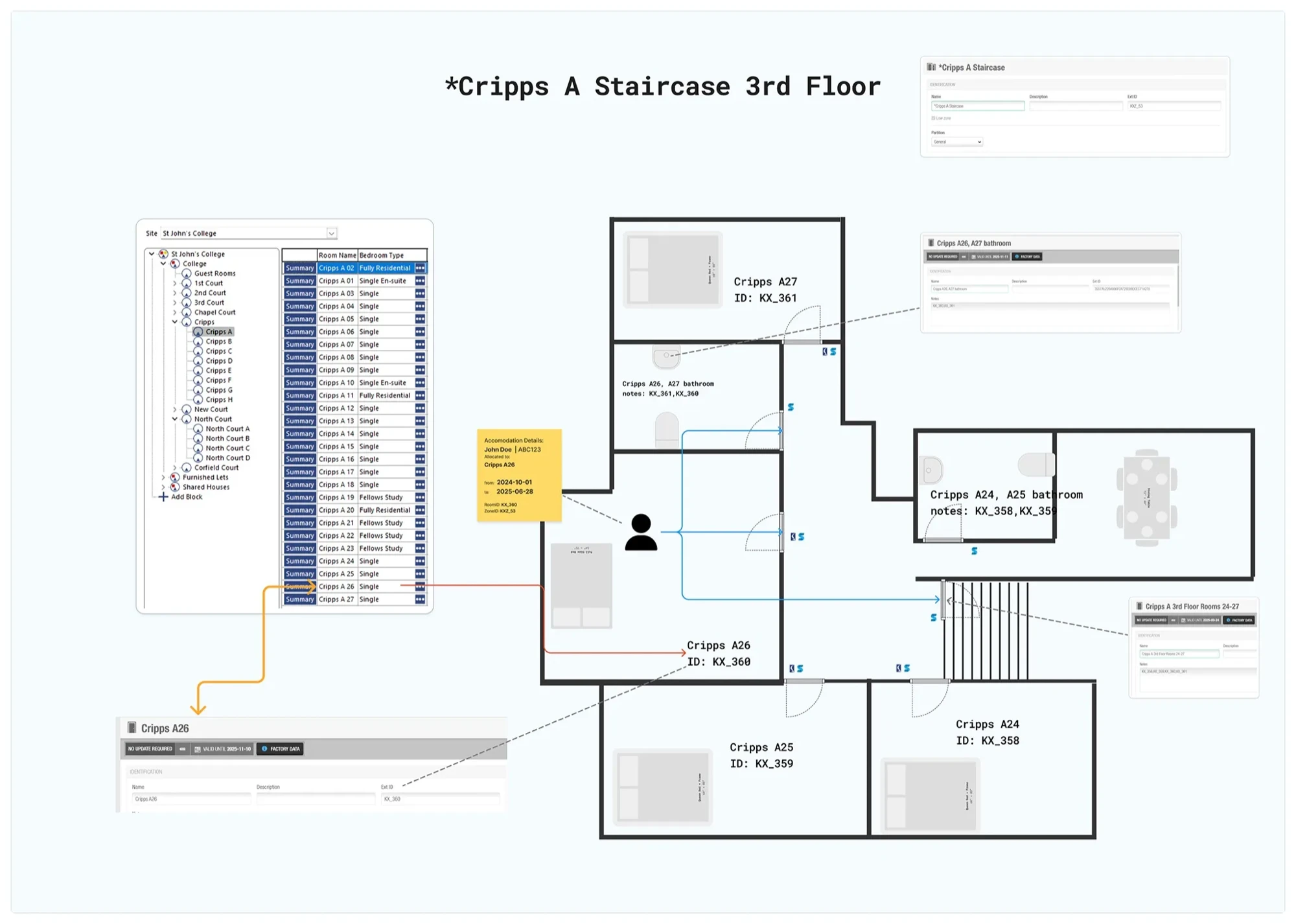 The complete mapping: Individual rooms use
 KX_ naming (Cripps A26 = KX_360), shared bathrooms use Notes field to list which rooms they serve (KX_360,KX_361). This floor plan
shows how naming convention connects KX room allocations to Salto door access.
Three Takeaways
- Define an ID contract.
KX_for rooms.KXZ_for zones. Both systems speak the same language. - Model the doors KX can't see. Bathrooms, staircases, entrances—they need explicit relationships (Notes field, zone mappings) because the booking system doesn't know they exist.
- Let allocations drive access, daily. The booking is the decision. The door lock is the enforcement. Sync them automatically, and responsibility stops being blurry.